Have you ever wondered how typing a simple website name like google.com instantly opens a webpage?
You don’t type numbers.
You don’t type server codes.
You just type a name — and it works.
Behind that simple process is a powerful system called DNS (Domain Name System).
In this detailed beginner-friendly guide, you’ll learn:
- What DNS is
- Why DNS exists
- How DNS works step by step
- Types of DNS servers
- Common DNS records
- Causes of DNS errors
- Why DNS affects website speed
Let’s break it down in simple terms.
What Is DNS?
DNS stands for Domain Name System.
It is the system that translates human-friendly domain names into computer-friendly IP addresses.
For example:
- Domain name: Pon.com.ng
- IP address: 192.168.1.10
Computers communicate using numbers (IP addresses).
Humans prefer names (domain names).
DNS connects the two.
Without DNS, you would need to memorize numbers for every website you visit — just like memorizing phone numbers before smartphones existed.
That would make the internet very difficult to use.
Why DNS Is Important
DNS is important because:
- It makes the internet easy to use
- It allows websites to change servers without users noticing
- It improves speed through caching
- It keeps global communication organized
Every time you:
- Open YouTube
- Check your email
- Visit your blog dashboard
DNS is working silently in the background.
How DNS Works (Step-by-Step Process)
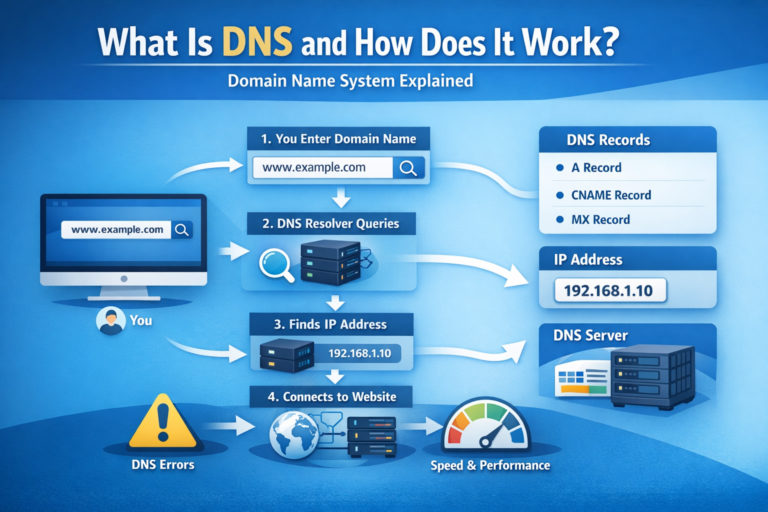
Let’s look at what happens when you type a website into your browser.
Step 1: You Enter a Domain Name
You type:
Your browser now needs to find the IP address of that domain.
Step 2: Your Device Checks Local Cache
Before asking the internet, your device checks:
Browser cache
Operating system cache
If the IP address was recently used, it loads immediately.
If not, the request moves forward.
Step 3: DNS Resolver Is Contacted
Your device sends the request to a DNS resolver.
This resolver is usually provided by:
- Your Internet Service Provider (ISP)
- Public DNS services like Google DNS
The resolver’s job is to find the correct IP address.
Step 4: Root DNS Server
If the resolver does not know the answer, it asks a Root DNS Server.
The root server directs it to the correct Top-Level Domain (TLD) server.
Step 5: TLD Server
The TLD server manages domain extensions like:
- .com
- .org
- .net
The TLD server then points to the domain’s authoritative server.
Step 6: Authoritative DNS Server
This server holds the real DNS records of the domain.
It responds with the correct IP address.
Example:
192.168.1.10
Step 7: Website Loads
Your browser now connects to that IP address.
The website server responds, and the page loads.
All this happens in milliseconds.
Types of DNS Servers
There are four main types:
1. DNS Resolver
Receives your request and starts the lookup process.
2. Root Name Server
Directs requests to the correct TLD server.
3. TLD Name Server
Handles domain extensions like .com and .org.
4. Authoritative Name Server
Contains the actual DNS records for a domain.
Each one plays a specific role.
Common DNS Record Types
DNS information is stored in records.
Here are the most important ones:
A Record
Maps a domain to an IPv4 address.
Example:
example.com → 192.168.1.10
AAAA Record
Maps a domain to an IPv6 address.
CNAME Record
Redirects one domain name to another.
Example:
blog.example.com → incofyblog.com
MX Record
Specifies mail servers for email delivery.
Without MX records, emails won’t work.
TXT Record
Stores verification and security information.
Often used for:
- Domain verification
- Email security (SPF, DKIM)
What Causes DNS Errors?
Sometimes websites fail to load because of DNS problems.
Common causes include:
- Expired domain name
- Incorrect DNS configuration
- Server downtime
- DNS cache corruption
- ISP DNS issues
You might see errors like:
- DNS_PROBE_FINISHED_NXDOMAIN
- Server DNS address could not be found
- DNS server not responding
Often, clearing your DNS cache fixes the problem
How DNS Affects Website Speed
DNS lookup time affects how fast your website loads.
If DNS resolution is slow:
- The website takes longer to start loading
- User experience decreases
- SEO performance may drop
That’s why many website owners use:
- Fast DNS providers
- Content Delivery Networks (CDNs)
- Optimized DNS caching
Fast DNS = Faster website.
Simple Real-Life Example
Think of DNS like this:
You want to visit your friend “John”.
You don’t know his house number.
But you know his name.
You check a directory that tells you:
John → House 25, Blue Street
DNS works the same way.
It finds the “house address” (IP address) for the “name” (domain).
Final Thoughts
DNS is one of the most important systems on the internet.
It translates domain names into IP addresses so browsers can load websites.
Without DNS:
- The internet would be difficult to use
- You would memorize numbers
- Websites wouldn’t load easily
Now that you understand DNS, you’re building real technical knowledge about how the internet works.
And if you’re serious about tech blogging, understanding topics like DNS helps you create deeper, more authoritative content.